

So you’ve reached your final year. Congratulations — you made it this far. But now everyone around you is talking about the FYP, your supervisor keeps sending emails, or your teachers and fellows discussing about FYP everywhere and you have absolutely no idea where to even begin. Sound familiar? Don’t worry. You’re not alone. Every single BS student has felt exactly this way.
1. What Is a Final Year Project (FYP)?
A Final Year Project — or FYP — is the big capstone project you complete in your last year of a Bachelor’s degree. It’s not a quiz. It’s not a mid-semester assignment. It’s a full-scale, real-world project that you plan, build, test, and present — usually over one or two semesters.
Think of it like this: if your whole degree was a cooking school, then the FYP is the moment where you actually open your own restaurant — even if it’s just for one evening. You use everything you’ve learned and create something real.
In most universities in Pakistan and across South Asia, your FYP carries heavy marks — sometimes 6 to 9 credit hours — and it can genuinely make or break your final CGPA.
Why Is FYP So Important for BS Students?
Here’s the truth nobody tells you clearly enough:
- Your FYP is the ONE project you can show to employers and say, “I built this.”
- It teaches you how to work in a team under real deadlines.
- It forces you to research, document, present, and defend your work — skills that every professional needs.
- A strong FYP can lead to a research paper publication, freelance portfolio work, or even a startup idea.
- Most hiring managers in tech will ask you about your FYP in interviews.
In short: your FYP is not just a university requirement. It’s your first real professional project.
What Makes FYP Different from Regular Assignments?
Regular assignments have a clear question, a clear answer, and a one-week deadline. FYP is nothing like that.
- FYP has no fixed answer — you decide what to build.
- It runs for months, not days.
- You work in a team, not alone.
- You have to manage time, conflict, scope, bugs, and documentation — all at once.
- You will be judged by a panel of faculty members who will ask hard questions.
It’s the most challenging — and most rewarding — thing you’ll do in your degree.
The Emotional Journey of FYP (And Why It’s Completely Normal)
Let’s be honest about what the FYP journey actually feels like:
- Month 1: “This is exciting! I’m going to build something amazing!”
- Month 2: “Okay, this is harder than I thought.”
- Month 3: “My team is falling apart and nothing works.”
- Month 4: “I haven’t slept properly in two weeks.”
- Final Week: “We did it. I can’t believe we actually did it.”
Every student goes through this rollercoaster. The fear, the confusion, the frustration — it’s all part of the process. This guide won’t make it painless, but it will make it a lot less scary.
What You’ll Learn from This Guide
By the end of this article, you’ll know:
- How to generate and evaluate FYP ideas properly
- How to form the right team
- How to write a proposal that gets approved
- How to plan, build, test, and document your project
- How to ace your final defense
- What mistakes to avoid (that most students make too late)
Let’s get into it.
2. Understanding the FYP Lifecycle
Before you dive into anything, it helps to see the big picture. Here’s how a typical FYP journey flows from start to finish:
- STAGE 1 → Idea Generation
- STAGE 2 → Idea Evaluation & Selection
- STAGE 3 → Proposal Writing & Approval
- STAGE 4 → Team Formation
- STAGE 5 → Planning & Scheduling
- STAGE 6 → Development / Research / Implementation
- STAGE 7 → Testing & Evaluation
- STAGE 8 → Documentation
- STAGE 9 → Final Presentation & Defense
- STAGE 10 → Submission
Stage 1: Idea Generation
This is where you brainstorm. You look at problems around you, browse research papers, and think about what you actually want to build. Don’t rush this stage.
Stage 2: Idea Evaluation & Selection
You have a few ideas — now you narrow them down using structured techniques like SWOT, feasibility analysis, and peer feedback. You pick the one that is realistic AND meaningful.
Stage 3: Proposal Writing & Approval
You write a formal document describing what you’ll build, why, and how. Your supervisor and/or a committee reviews and approves (or asks for changes).
Stage 4: Team Formation
You finalize who is working with you, assign roles, and set ground rules. (Many teams actually do this before Stage 3 — that’s fine too.)
Stage 5: Planning & Scheduling
You build a timeline, create a Gantt Chart, and decide on milestones. This is your roadmap for the entire project.
Stage 6: Development / Research / Implementation
This is the actual building phase — writing code, conducting surveys, designing interfaces, training models. The longest and most intense stage.
Stage 7: Testing & Evaluation
You test what you built to make sure it works. Unit tests, user testing, bug fixing — all of it happens here.
Stage 8: Documentation
You write up everything: what you built, how you built it, why you made certain decisions, and what results you got. This is often left too late.
Stage 9: Final Presentation & Defense
You present your project to a panel of faculty. They ask questions. You defend your decisions and show a live demo.
Stage 10: Submission
You submit the final documentation, source code, and any required materials to the university. Done!
Understanding this lifecycle means you’ll never be completely lost — you’ll always know what stage you’re in and what comes next.
3. How to Generate FYP Ideas
The most common question students ask is: “Where do I even find a good idea?” Here’s the honest answer: great ideas are everywhere. The problem isn’t that ideas don’t exist — it’s that students look in the wrong places or freeze up waiting for a “perfect” idea.

Where Do Good Project Ideas Come From?
1. Look at Problems Around You
The best FYP ideas solve real problems. Walk around your university, your neighborhood, your city. What’s frustrating people? What takes too long? What still relies on paper when it could be digital?
Example: A student in Skardu noticed that local schools had no system to track student attendance. He built a simple SMS-based attendance alert system for parents. Simple. Real. Impactful.
2. Browse Research Papers and Existing Work
Don’t be afraid to look at what others have done. These platforms are free and full of ideas:
- Google Scholar (scholar.google.com)
- IEEE Xplore (ieeexplore.ieee.org)
- ResearchGate (researchgate.net)
- Semantic Scholar (semanticscholar.org)
- GitHub (github.com) — search trending projects
- Kaggle (kaggle.com) — great for AI/data science ideas
Read abstracts of papers from the last 2–3 years. You’ll see gaps, limitations, and opportunities to build on existing work.
3. Look at Trending Technologies
Technology trends give you direction. Right now, these areas are hot:
- Artificial Intelligence & Machine Learning
- Mobile App Development (Android/iOS)
- IoT (Internet of Things) — smart home, smart farming
- Blockchain — supply chain, certificates
- Web Platforms — SaaS tools, portals, dashboards
- Cybersecurity tools
- EdTech (educational technology)
- HealthTech (hospital management, telemedicine)
4. Talk to Industry Professionals and Alumni
Senior students who already completed their FYP are gold. Ask them what they wish they had built. Talk to local businesses — they often have problems they can’t afford to solve professionally.
5. Think About Your Own Interests and Skills
If you hate databases, don’t build a project that’s 90% database work. Pick something in an area you genuinely enjoy — you’ll have to spend months on it, so make sure you won’t hate every minute.
PRO TIP: The best idea is one that solves a real problem you actually care about. Passion will carry you through the hard months when motivation disappears.
4. Idea Evaluation Techniques
So you have a few ideas. Great. Now comes the part most students skip — actually evaluating those ideas properly. Jumping straight into development with a bad idea is one of the top reasons FYPs fail.
Here are seven powerful techniques to evaluate your idea before committing.
A) SWOT Analysis for FYP Ideas
SWOT stands for Strengths, Weaknesses, Opportunities, and Threats. It’s a simple but powerful framework to look at your idea from four angles.
- Strengths → What does your idea do well? What advantages does it have?
- Weaknesses → Where is it lacking? What problems might arise internally?
- Opportunities → What external factors make this idea timely or valuable?
- Threats → What could go wrong from the outside? Competitors? Privacy laws?
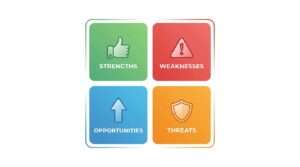
Example: Applying SWOT to “University Attendance App using Face Recognition”
Strengths:
- Automates a manual, time-consuming process
- Uses widely available technology (OpenCV, Python)
- Has a clear user base (students and faculty)
Weaknesses:
- Requires good lighting and camera quality
- Face recognition can struggle with masks or similar faces
- Needs a database of student photos to be collected first
Opportunities:
- No such system exists in most local universities
- Can be expanded to include hostel entry/exit tracking
- Could become a product for multiple universities
Threats:
- Privacy concerns — students may object to being tracked
- University may not want to invest in cameras
- Existing systems (manual registers) have zero cost
B) Feasibility Analysis
Feasibility analysis asks one simple question: Can we actually do this? It has four parts:
Technical Feasibility
Do you have the skills to build this? If your idea needs deep blockchain knowledge but your team has never touched it, that’s a red flag. You can learn — but be realistic about how much time you have.
Ask: “Can we build this with what we know, or what we can learn in time?”
Financial Feasibility
Can you afford it? Some projects need paid APIs, server hosting, hardware (sensors, cameras, Raspberry Pi), or survey tools. Make a rough budget.
Ask: “Will this cost money? Do we have it?”
Time Feasibility
Your FYP runs for one or two semesters — not forever. Can you actually complete this idea in that time? A project that needs 3 years of data collection is not FYP-friendly.
Ask: “Can we realistically finish this before the deadline?”
Operational Feasibility
Will anyone actually use it? If you build a hospital management system but no hospital agrees to test it, your project has no real-world impact.
Ask: “Who will use this? Can we get access to real users for testing?”
C) MoSCoW Prioritization Method
This technique helps you define WHAT your project will actually include — and what it won’t. MoSCoW stands for:
- Must Have → Core features without which the project doesn’t work
- Should Have → Important features, but the project works without them
- Could Have → Nice-to-have features if time allows
- Won’t Have → Features explicitly out of scope for this version
Example: For a Face Recognition Attendance App:
- Must Have: Face detection, attendance recording, admin dashboard
- Should Have: Email/SMS notifications to parents, export to Excel
- Could Have: Mobile app version, multi-camera support
- Won’t Have: Payroll system integration, biometric fingerprint support
This method prevents scope creep — the deadly habit of adding features endlessly until the project collapses under its own weight.
PRO TIP: Print your MoSCoW list and stick it above your desk. Every time someone says “Can we also add…?” — check if it’s a MUST or a WON’T. Most “Can we also add” requests are WON’Ts.
D) Novelty Check
One of the biggest fears students have is: “What if someone already did this?” The answer: almost everything has been done in some form. What matters is whether you bring a new angle, a different context, or an improvement.
How to Check If Your Idea Already Exists:
- Search Google Scholar and IEEE Xplore using keywords from your idea
- Check GitHub for existing open-source projects
- Search ResearchGate and Semantic Scholar for related papers
How to Add Novelty:
If a face recognition attendance system already exists, you can add novelty by:
- Targeting a specific context (rural schools with low bandwidth)
- Adding a feature no existing system has (multi-language UI)
- Using a newer, better algorithm (YOLOv8 instead of Haar Cascade)
- Combining it with something else (IoT + Face Recognition)
Novelty doesn’t mean you must invent something brand new. It means you make an existing idea better, more specific, or more applicable to your context.
E) Supervisor / Mentor Feedback
Before you fall in love with your idea, show it to your supervisor. This sounds scary, but your supervisor has seen hundreds of FYPs. They know instantly if an idea is too big, already done to death, or genuinely promising.
How to Present Your Idea Confidently:
- Prepare a 1-page summary: What is the problem? What is your solution? Who will use it? What technology will you use?
- Come with questions, not just statements. “We were thinking X, but we’re not sure about Y — what do you think?”
- Be open to changes. Don’t defend your idea emotionally. Take feedback as free expertise.
Most supervisors appreciate students who come prepared and humble. They dislike students who disappear for weeks and then submit a bad proposal.
F) Peer Review & Brainstorming
Before finalizing your idea, run it by your classmates — especially ones who will be honest with you.
The “Devil’s Advocate” Technique:
Ask one friend to specifically try to break your idea. Their job is to find every flaw, ask every hard question, and poke holes in your plan.
- “How will you collect that data?”
- “What happens if the university doesn’t cooperate?”
- “Isn’t this exactly what [existing app] already does?”
This feels uncomfortable, but it’s exactly what the defense panel will do. Better to find the weaknesses now than in front of a committee.
G) Scoring Matrix (Decision Matrix)
If you have 2–3 ideas and can’t decide, use a scoring matrix. Rate each idea against key criteria on a scale of 1–5.
Example: Comparing Three FYP Ideas
| Criteria | Weight | Attendance App | E-Commerce Site | AI Chatbot |
|---|---|---|---|---|
| Feasibility | 25% | 4 | 5 | 3 |
| Personal Interest | 20% | 3 | 3 | 5 |
| Novelty | 20% | 4 | 2 | 4 |
| Real-world Impact | 20% | 5 | 4 | 3 |
| Available Resources | 15% | 3 | 4 | 4 |
| Weighted Score | 100% | 3.8 | 3.7 | 3.8 |
In this case, Attendance App and AI Chatbot are tied — so the tiebreaker is personal interest. The student loves AI, so they go with the chatbot. This method removes gut-feeling bias and helps you make a rational decision you can defend to your supervisor.
5. How to Choose Your FYP Team
Your team can make or break your FYP. You might have the best idea in the batch, but if your team falls apart in month two, none of it matters. Choosing the right teammates is just as important as choosing the right idea.

Ideal Team Size
Most universities recommend 3–4 members for a BS FYP. Here’s why:
- Too small (1–2 people): Too much work for too few people. Burnout is real.
- Just right (3–4 people): Enough to divide work, small enough to coordinate.
- Too large (5+ people): Hard to manage. Some people always end up doing very little while others carry the load.
If your university allows groups of 3–4, aim for 4 — it gives you a buffer in case someone drops or slows down.
What Roles Are Needed in an FYP Team?
Project Manager / Team Lead
This person keeps track of deadlines, schedules meetings, communicates with the supervisor, and makes sure the team stays on track. Skill needed: Organized, good communicator, calm under pressure.
Developer / Researcher
The person who does the main technical work — coding the backend, training the model, setting up the database. Skill needed: Strong in the core technology being used.
Designer / Front-End
Handles the user interface, makes the app or website look good, and thinks about user experience. Skill needed: HTML/CSS/JavaScript, Figma, UI sense.
Documentation & Presentation Lead
Writes the FYP report, prepares slides, and handles references. Skill needed: Good writing, attention to detail, MS Word / LaTeX.
One person can wear two hats in a team of 3 — that’s fine. What matters is that every role is covered by someone who takes it seriously.
How to Choose Teammates Wisely
Choose Complementary Skills, Not Just Friends: Your best friend might be the worst person for your FYP team if they’re disorganized, miss deadlines, or don’t have the skills you need. Be honest about this early.
Look for Commitment, Not Just Talent: A moderately skilled person who shows up every day beats a talented person who disappears for weeks. Commitment matters more than genius.
Discuss Expectations Before You Start: Have an honest conversation before officially forming the team. Ask:
- How many hours a week can you commit?
- What do you expect from teammates?
- What happens if someone doesn’t do their part?
Set Clear Roles from Day One: Don’t let roles stay vague. Unclear roles = everyone assumes someone else is doing the work = nothing gets done.
Red Flags to Watch Out for in Teammates
- “I’m busy this week, let’s start next week” — every single week
- Never responds to group messages within 24 hours
- Has a history of skipping group projects in other courses
- Says “just add my name, I’ll contribute later”
- Gets defensive whenever their work is questioned
- Constantly starts new features without finishing existing ones
How to Set Team Rules from Day One
Write down a simple team agreement in your first meeting. Cover:
- How often you’ll meet (weekly? twice a week?)
- How you’ll make decisions when you disagree
- What happens if someone misses a deadline repeatedly
- How the final grade credit will be justified internally
It sounds formal for a student project, but teams that do this fight less.
Tools for Team Collaboration
- GitHub — Version control. Non-negotiable. Use it.
- Trello — Simple task boards. Great for tracking who’s doing what.
- Notion — Notes, documentation, planning — all in one place.
- Google Docs — Collaborative writing for the report.
- WhatsApp — Day-to-day quick communication.
- Slack — More professional than WhatsApp, good for file sharing.
Best Free AI Tools for Academic Research
6. Writing a Strong FYP Proposal
Your FYP proposal is the first official document you’ll submit. It’s how your supervisor and the FYP committee decide: is this worth approving? Think of it like a pitch to investors — except your “investors” are your faculty, and instead of money, they’re investing their time and university resources.
Key Sections of a Good FYP Proposal
1. Title
Keep it clear and specific.
Bad: “Attendance System.”
Good: “Automated Student Attendance Tracking Using Face Recognition for University Campuses.”
2. Abstract
A 150–200 word summary of the entire project.
What’s the problem?
What’s your solution?
What technology?
What’s the expected outcome?
Write this LAST, even though it goes first.
3. Problem Statement
Explain the real problem your project is solving. Be specific. Use data if you can. “According to X, Y% of universities in Pakistan still track attendance manually, leading to Z inefficiencies.”
4. Objectives
Write 3–5 clear, measurable objectives. Start each with an action verb. Example:
- To develop a face recognition module with 90%+ accuracy
- To build an admin dashboard for real-time attendance viewing
- To evaluate the system with 50 real users
5. Scope and Limitations
What IS included in your project? What is NOT? Be honest about limitations — it shows maturity, not weakness. Example: “This system will not support night-time face detection.”
6. Methodology
How will you build it? Waterfall? Agile?
List the phases: design, development, testing, deployment.
Keep it simple and clear.
7. Tools & Technologies
List everything: programming language, frameworks, database, APIs, IDE, hardware (if any).
Example: Python, OpenCV, Flask, MySQL, VS Code.
8. Timeline / Gantt Chart
Break the project into weeks or months. Show what will be done when. Even a rough table is better than nothing.
9. Expected Outcomes
What will exist when you’re done?
A web app?
A mobile app?
A model with X% accuracy?
A system tested with real users?
10. References
Cite 5–10 related papers or resources that support your idea. Use APA or IEEE format as your university requires.
Tips for Each Section
- Problem Statement: Don’t be vague. “Attendance is a problem” is bad. “Faculty at X University spend 15 minutes per session on manual attendance” is good.
- Objectives: Don’t write more than 5. Three strong, measurable objectives are better than eight vague ones.
- Methodology: Don’t copy-paste a generic Agile definition. Explain how YOU will use it for YOUR specific project.
- Timeline: Be realistic. If you think something takes 2 weeks, write 3. Things always take longer than you expect.
Common Mistakes in Proposals
- Submitting with spelling errors (proofread three times)
- Writing a problem statement that’s just an introduction
- Objectives that are not measurable (“improve the system”)
- A timeline that’s obviously copy-pasted from a template
- Missing or low-quality references (Wikipedia does NOT count)
- Scope that is impossibly large for a one-year project
PRO TIP: Ask a classmate whose FYP proposal was already approved to review yours. They’ll catch things you missed.
7. Planning & Scheduling Your FYP
“We’ll figure it out as we go” is the most dangerous sentence in any FYP team. Students who don’t plan at the start spend the last month doing everything in a panic. Students who plan well spend the last month polishing — which is a much better place to be.

How to Create a Realistic Timeline
Start by listing every major task your project needs. Then estimate how long each takes — honestly. Then add a 20% buffer. Things always take longer. Here’s a rough example for a 2-semester FYP:
Semester 1 (Months 1–5):
- Month 1: Finalize idea, form team, submit proposal
- Month 2: Literature review, system design, UI mockups
- Month 3: Core development begins (database, backend)
- Month 4: Frontend development, integration
- Month 5: Internal testing, supervisor review, semester report
Semester 2 (Months 6–9):
- Month 6: Bug fixes, feature completion
- Month 7: User Acceptance Testing with real users
- Month 8: Documentation writing
- Month 9: Final polishing, presentation prep, defense
What Is a Gantt Chart?
A Gantt Chart is a horizontal bar chart that shows your tasks against time. It’s the most widely used project planning tool in the world — and it’s easy to make.
Free Tools to Make Gantt Charts:
- Microsoft Excel (simple, widely available)
- Google Sheets (collaborative)
- Notion (with timeline view)
- GanttProject (free desktop app)
- TeamGantt (free online tool)
Milestone Planning
Break your project into checkpoints (milestones). Each milestone is a mini-deadline that keeps the team accountable. Example milestones:
- Milestone 1: Proposal approved (Week 2)
- Milestone 2: Database designed and set up (Week 6)
- Milestone 3: Core features functional (Week 12)
- Milestone 4: All testing complete (Week 18)
- Milestone 5: Documentation submitted (Week 22)
- Milestone 6: Defense presentation ready (Week 24)
If you’re falling behind a milestone, catch it early and adjust — don’t just ignore it and hope it works out.
Agile vs Waterfall: Which Is Better for FYP?
Waterfall
A linear approach. You complete Phase 1 fully before moving to Phase 2. Design → Build → Test → Document → Submit.
- Good For: Projects where requirements are very clear from day one.
- Bad For: Projects where things change a lot as you learn more.
Agile
A flexible, iterative approach. You work in short “sprints” (1–2 weeks), build a piece, test it, get feedback, then move to the next piece.
- Good For: Software projects, apps, web platforms.
- Bad For: Students who lack discipline (unlimited flexibility = no progress).
For Most FYP Projects: A hybrid approach works best. Use Waterfall for your overall project phases (plan the big picture). Use Agile sprints for the development phase (build in small pieces). This gives you structure AND flexibility — the best of both.
8. The Development / Implementation Phase
This is where the actual building happens. Code gets written. Designs get made. Models get trained. And a hundred things break in ways you didn’t expect. Here’s how to survive this phase with your sanity intact.

How to Start Without Feeling Overwhelmed
The biggest mistake students make: they try to build everything at once. Instead, start with the smallest possible working version. Just get one thing to work. If you’re building an attendance app, first just get the camera to detect a face — nothing else. That tiny win builds momentum.
This idea — start small, make it work, then grow it — is called the MVP approach (Minimum Viable Product). Build the core first, add features later.
Work in Sprints
Divide your development into 1–2 week sprints. Each sprint has a goal.
- Sprint 1 goal: Get the database designed and set up.
- Sprint 2 goal: Build the user login and registration.
- Sprint 3 goal: Get face detection working.
- Sprint 4 goal: Connect face detection to the database.
At the end of each sprint, you should have something you can show your supervisor. This keeps you accountable and gives you regular progress to celebrate.
Version Control with GitHub — Non-Negotiable
Every FYP team must use GitHub. No exceptions. Here’s why:
- If someone’s laptop dies, your code is not gone.
- You can go back to an earlier version if something breaks.
- Multiple team members can work on different parts simultaneously.
- Your supervisor can see your progress history.
- It shows future employers that you know professional practices.
If you’ve never used GitHub, spend two hours on a beginner tutorial before development starts. It will save you many more hours of pain later.
PRO TIP: Commit your code to GitHub at the end of EVERY working session. Make it a habit, like saving a document.
Regular Meetings with Your Supervisor
Meet your supervisor at least once every two weeks during development. Show them what you’ve built, even if it’s incomplete. Get feedback early. The worst thing you can do is disappear for six weeks and then show up with something that’s going in the completely wrong direction. That’s how teams end up having to restart everything in the final month.
Prepare for each meeting:
- What did we complete since last time?
- What problems are we facing?
- What will we complete by next meeting?
Document as You Build
Don’t wait until the project is complete to start writing documentation. Write a little every week.
- When you design the database, write the ER Diagram section.
- When you finish the login module, write that implementation section.
- When you make a design decision, note WHY you made it.
Students who leave documentation for the last two weeks suffer enormously. Students who document gradually have a nearly complete report by defense time.
Common Challenges and How to Solve Them
Problem: “The API we planned to use is not free.”
Solution: Find an alternative or redesign that part early. Don’t wait.
Problem: “A team member stopped contributing.”
Solution: Have a direct conversation first. If it continues, inform your supervisor before it becomes a crisis.
Problem: “We can’t figure out a technical bug.”
Solution: Stack Overflow, YouTube, GitHub Issues, and asking your supervisor or a classmate. Don’t sit stuck for days alone.
Problem: “Scope is growing and we’re behind.”
Solution: Go back to your MoSCoW list. Cut the “Could Haves.” Focus on delivering the “Must Haves” perfectly.
9. Testing & Evaluation
“We tested it and it works.” That’s not enough for an FYP. You need to test properly, document those tests, and show the results clearly. Testing is not optional. It’s what separates a project from a prototype.
Types of Testing Relevant to FYP
Unit Testing
Testing individual components or functions in isolation.
Example: Test that the face detection function correctly identifies a face from 10 different images.
Why it matters: Catches bugs at the source before they spread.
Integration Testing
Testing how different parts of your system work together.
Example: Does the face detection module correctly pass data to the database module? Does the database correctly update the attendance record?
Why it matters: Parts that work alone sometimes break when connected.
User Acceptance Testing (UAT)
Giving your system to real users and asking them to actually use it.
Example: Ask 20 students to log in, mark attendance, and report any issues they faced.
Why it matters: Real users find bugs that developers never think to test. This is also great for your documentation — “Tested with 20 real users” sounds much better than “We tested it ourselves.”
Performance Testing
Testing how your system performs under load or with real data.
Example: Does the face recognition slow down with 500 faces in the database? Does the website crash if 50 users log in simultaneously?
Why it matters: Shows your system is robust, not just functional.
How to Collect User Feedback
Create a simple Google Form with 5–10 questions after your UAT session. Ask:
- How easy was it to use? (1–5 scale)
- Did you face any errors?
- What feature would you most like to see improved?
- Would you use this system regularly? Why or why not?
Analyze the results and include them in your documentation. Even negative feedback is valuable — it shows you’re honest and professional.
When Things Don’t Work as Expected
Don’t panic. Don’t hide it. Every FYP has bugs. Every system has limitations. What the committee wants to see is that you understood the problem, tried to fix it, and can explain WHY something didn’t work as planned.
“Our face recognition accuracy dropped to 72% in low-light conditions. We attempted to improve this by adjusting the brightness threshold, which raised accuracy to 81%. We recommend better lighting hardware as a future improvement.”
That kind of honest, analytical response impresses panels far more than pretending everything works perfectly.
10. FYP Documentation
Documentation is the part of FYP that almost every student hates. And almost every student leaves it too late. Here’s the truth: your documentation tells the story of your project. A great system with poor documentation will score lower than a decent system with excellent documentation. Yes, that’s unfair. But it’s also reality.
What Goes Into Complete FYP Documentation?
1. Title Page
Project title, team members, supervisor name, university name, submission date. Keep it clean and formatted.
2. Abstract
150–250 words. What problem, what solution, what result. Think of it as an elevator pitch on paper.
3. Table of Contents
Auto-generated in MS Word. Don’t manually type page numbers.
4. Introduction
Background, motivation for the project, objectives, and document structure. (What does each chapter cover?)
5. Literature Review
What research already exists on your topic? What did they do? What gaps exist? How does your project fill those gaps? Use minimum 10 academic references. IEEE and APA formats are standard.
6. Methodology
How did you approach this project? Waterfall? Agile? What were the main phases? Include your Gantt Chart here.
7. System Design
This is where your technical diagrams go:
- Use Case Diagrams — who uses the system and how
- Data Flow Diagrams (DFDs) — how data moves through the system
- Entity Relationship Diagrams (ERDs) — your database structure
- Architecture Diagrams — how all components connect
- UI Wireframes / Mockups — what the interface looks like
8. Implementation
Describe what you actually built. Key code snippets (not the whole code), screenshots of working features, explanation of how you built the system.
9. Testing
Your test cases, test results, and UAT feedback. Include tables.
10. Results & Discussion
What did you achieve? Did you meet your objectives? What worked well? What didn’t? Be honest. Analyze your results.
11. Conclusion & Future Work
Summarize the project. What would you improve or add if you had more time? This shows maturity and forward-thinking.
12. References
Every source you cited. Formatted correctly in APA or IEEE.
13. Appendices
Extra material that’s too long for the main document: full survey forms, complete code listings, additional screenshots, raw data.
Formatting Tips
- Font: Times New Roman 12pt or Arial 11pt (check your university’s format)
- Line spacing: 1.5 or double-spaced for main text
- Headings: Bold, hierarchical (Heading 1, Heading 2, Heading 3)
- Citation style: IEEE is standard for CS/SE/IT; APA for some universities
- Page numbers: Bottom center or bottom right
- Margins: 1 inch all around (some universities want 1.5 inch on left for binding)
PRO TIP: Use tools like Mendeley or Zotero to manage your references automatically. It saves hours and eliminates formatting errors in your bibliography.
11. Final Presentation & Defense
The defense is the moment you’ve been preparing for. It’s intimidating, yes. But it’s also your chance to show off months of hard work in front of people who actually care what you’ve built.

What Happens During an FYP Defense?
- You present your project using slides (usually 15–25 minutes)
- You do a live demo of your working system
- The panel (2–4 faculty members) asks you questions
- Each team member may be asked questions separately
- You get graded on: project quality, understanding, presentation, and defense
Your Presentation Slides: A 10–15 Slide Guide
- Title, team names, supervisor name
- Problem Statement — what problem you solved and why it matters
- Related Work — what others have done (1–2 key papers)
- Objectives — your 3–5 measurable goals
- System Architecture — the big-picture design diagram
- Technologies Used — your tech stack
- Key Feature 1 — screenshot + brief explanation
- Key Feature 2 — screenshot + brief explanation
- Testing Results — your test cases and UAT findings
- Results & Achievements — did you meet your objectives?
- Challenges Faced — what was hard and how you handled it
- Conclusion & Future Work
- References
- Thank You / Q&A
Keep slides clean. Use visuals, screenshots, and diagrams. Minimal text on slides — you speak the details, not your slides.
What Questions Will the Panel Ask?
Common defense questions include:
- “Why did you choose this technology over [alternative]?”
- “What is the accuracy of your model and how did you measure it?”
- “How is your system different from [existing system]?”
- “What would you change if you started over?”
- “What are the security risks in your system?”
- “How does your system scale if the number of users grows?”
- “Explain this part of your code.” (They may point to something specific)
How to Handle Tough Questions:
- If you know the answer: Answer clearly and confidently.
- If you’re not sure: “That’s a great question. Based on what we know, I believe [your best answer]. We didn’t specifically test for that, but it would be an interesting future experiment.”
- If you don’t know: “I’m not certain about that — but I’d be happy to research and follow up.” Never bluff. Panels can tell immediately.
Demo Tips: Showing Your Project Live
- Test your demo setup the night before AND one hour before the defense.
- Use pre-loaded test data. Don’t type sample data live — it wastes time and something always goes wrong.
- Have a backup plan: recorded video of the demo, in case of internet/technical failure.
- Don’t show the loading screen without warning. Prepare the panel: “This takes about 10 seconds to load the model — let me explain what’s happening in the meantime.”
Presentation Confidence Tips
- What to Wear: Dress semi-formally at minimum. First impressions matter even in academic settings. Clean clothes, neat appearance.
- How to Stand: Stand straight, face the panel, don’t turn your back to them to read your slides. Know your slides well enough to face forward.
- How to Speak: Speak slowly and clearly. Pause between sections. Nervousness makes people speak too fast. Practice out loud at least 3 times.
- Practice with Your Team: Do a full mock defense with a friend playing the “tough professor.” Record it on your phone and watch it back.
PRO TIP: The panel is not trying to fail you. They want to see that you understand YOUR project. Speak about it like someone who built it — because you did.
12. Common Mistakes Students Make in FYP
These are the mistakes that show up in almost every batch. Learn from other people’s pain so you don’t repeat it.
Mistake 1: Starting Too Late
“We still have six months, relax.” Famous last words. Six months sounds like a lot until you realize two months are eaten by exams, one month by a team member’s personal crisis, and suddenly you have three months to do six months of work.
Fix: Start your proposal in Week 1. Not Week 6.
Mistake 2: Choosing an Idea That’s Too Big or Too Vague
“We’ll build a complete social media platform like Facebook.” No. You won’t. Not in one year. Not with a team of four students. “We’ll do something with AI.” That’s not an idea. That’s a category.
Fix: Use the MoSCoW method and feasibility analysis BEFORE committing.
Mistake 3: Poor Team Communication
Weeks of silence in the group chat. “I thought YOU were doing that module.” “Nobody told me the deadline changed.”
Fix: Weekly meetings. Shared task board (Trello/Notion). Clear assignments.
Mistake 4: Not Meeting the Supervisor Regularly
Disappearing for two months and then submitting something wrong feels devastating. Supervisors can redirect you early — if you let them.
Fix: Schedule a bi-weekly meeting with your supervisor. Show up prepared.
Mistake 5: Leaving Documentation for the Last Week
“We’ll write the report after the code is done.” When the code is done, you have three days before submission. The report ends up rushed, incomplete, and riddled with errors.
Fix: Write one section of documentation every week during development.
Mistake 6: Scope Creep
It starts with “Let’s just add one more feature.” Then another. Then another. You end up with an unfinished project that tries to do everything and does nothing well.
Fix: Lock your scope after proposal approval. Additions require supervisor approval. Your MoSCoW list is the rule.
Mistake 7: Not Testing Properly
“We tested it and it works” means you clicked through it once and nothing crashed. That’s not testing.
Fix: Create a test plan. Write test cases. Do UAT with real users. Document everything.
Mistake 8: Plagiarized Literature Review
Copy-pasting paragraphs from papers into your literature review is plagiarism. Universities run Turnitin or similar checks. Getting caught can fail your FYP.
Fix: Read papers, understand them, and write summaries in your own words. Cite everything properly.
Mistake 9: No Version Control
“My laptop died and three weeks of code is gone.” “Ali made changes and now nothing works and we can’t go back.” Both of these are real situations that happen every year.
Fix: GitHub, from Day 1. Commit every session.
Mistake 10: Underestimating Presentation Preparation
Some teams build a genuinely great project and then present it so poorly that the panel leaves unimpressed. The presentation IS part of the grade.
Fix: Practice your presentation at least three times out loud. Do a mock defense. Time yourself. Prepare answers to likely questions.
13. Tips from Students Who Survived FYP
Sometimes the best advice comes from people who just went through it. Here’s what students on the other side wish they’d known:
“Start your proposal in week 1, not week 6. Everyone thinks they have time. Nobody does. The sooner your idea is on paper, the sooner you catch the problems with it.” — Software Engineering graduate, Islamabad
“Your supervisor is your ally, not your enemy. We were scared of our supervisor at first, so we avoided meetings. That was the biggest mistake. When we finally started meeting weekly, everything moved faster and with much less stress.” — CS graduate, Lahore
“Your first idea doesn’t have to be perfect. Just start. We changed our project idea three times in the first three weeks. That’s normal. But teams that overthink the idea forever never actually start.” — IT graduate, Karachi
“GitHub saved our entire project when my teammate’s laptop was stolen two months before defense. Every single line of code was safe on the repository. Please use GitHub from day one, even if it feels complicated at first.” — SE graduate, Peshawar
“Divide the documentation work from the beginning. We made the mistake of assigning it all to one person in the last month. That person almost had a breakdown, and the quality showed. Write a little every week.” — CS graduate, Gilgit
“When the panel asks a question you don’t know — don’t panic, don’t bluff. Just say ‘That’s something we didn’t specifically test for, but here’s how we’d approach it.’ They respect honesty far more than fake confidence.” — AI & Data Science graduate, Faisalabad
“Test your demo the night before AND one hour before the defense. Our internet dropped during the live demo. We had a recorded backup ready and it saved us completely. Always have a Plan B.” — Software Engineering graduate, Quetta
“Pick teammates based on work ethic, not friendship. My best friend and I paired up and it almost ended our friendship because our work styles were completely different. Choose people who will actually show up.” — IT graduate, Rawalpindi
The following quotes are illustrative examples based on common student experiences.
14. Conclusion
Let’s take a breath and look back at everything you now know. You started this guide not knowing where to begin. Now you know how to generate and evaluate ideas, how to build the right team, how to write a proposal that gets approved, how to plan without chaos, how to build systematically, how to test properly, how to write documentation that doesn’t torture you, and how to walk into your defense with confidence. That’s not a small thing. That’s the entire FYP journey — mapped out.
The Honest Truth About FYP
The FYP is hard. There will be weeks where nothing works. There will be moments where you question whether you made the right career choice. There will be teammates who disappear, supervisors who seem impossible to satisfy, and bugs that make no logical sense at 2 AM.
And then — after all of that — you’ll stand in front of a panel and demonstrate something you actually built. Something that works. Something that solves a real problem.
That feeling? There’s nothing else in your degree quite like it.
The FYP is the closest thing your university gives you to real professional work. Everything after this — your first job, your first client project, your first startup idea — will feel a little easier because you’ve already been through this.
You’ve Got This.
Seriously. Thousands of students before you felt exactly as lost as you do right now. They figured it out. You will too.
Start with the idea. Write the proposal. Form the team. Build in sprints. Document as you go. Test properly. Practice the presentation. Show up.
That’s it. That’s the whole formula.
Now go do it.





Leave a Comment
Your email address will not be published. Required fields are marked *
No Comments Yet
Be the first to share your thoughts!