

Searching for the best free AI tools for academic research can transform how you approach your studies and papers. As artificial intelligence revolutionizes academia, students and researchers now have access to powerful, cost-free resources that streamline literature reviews, data analysis, citation management, and paper writing. This comprehensive guide covers the top completely free AI tools that are changing academic research in 2024, helping you work smarter, not harder. Whether you’re an undergraduate facing your first major literature review or a seasoned professor conducting groundbreaking studies, these free academic AI tools will save you hundreds of hours while improving your research quality.
Why Every Student Needs Free AI Research Tools in 2026
The landscape of academic research has evolved dramatically with AI integration. Free AI research tools democratize access to advanced technology that was once available only to well-funded institutions. From automating tedious literature reviews to analyzing complex datasets, these free academic AI tools help level the playing field. According to recent studies, researchers using AI tools report a 47% reduction in literature review time and a 35% improvement in source relevance. Whether you’re an undergraduate tackling your first major paper or a PhD candidate conducting groundbreaking research, implementing AI tools for academic research free can reduce your workload by 40-60% while improving research quality and depth.
Related Reading: For general AI writing assistance beyond research, see our comprehensive guide on the Best AI Writing Tools 2026.
7 Best Free AI Tools for Academic Research
This comprehensive comparison highlights the best free AI tools for academic research available today. Each tool addresses specific research needs while maintaining completely free access tiers suitable for students and independent researchers. We’ve ranked these based on usability, feature depth, and real-world academic impact.
1. Semantic Scholar – Best for Literature Discovery
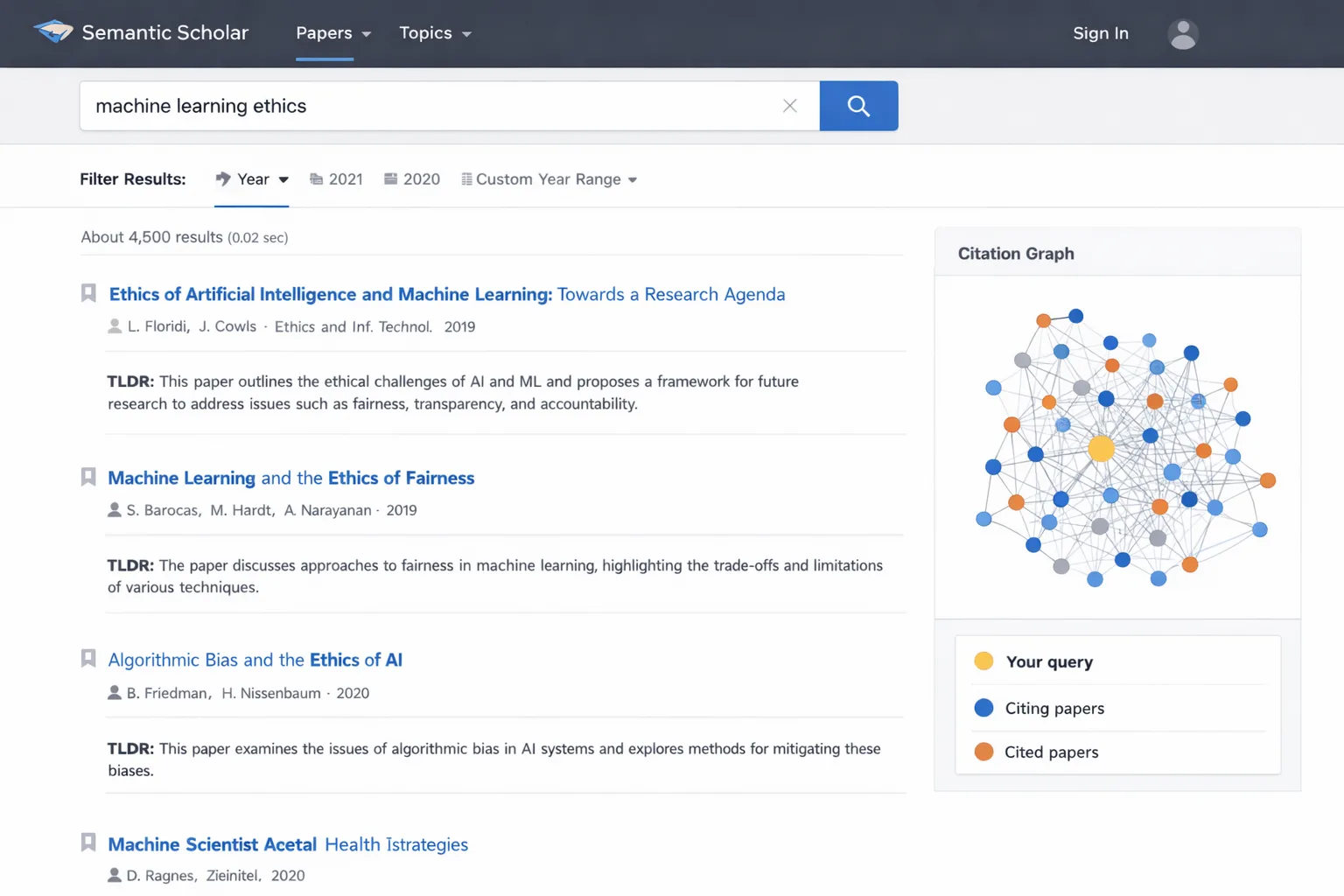
When seeking the best free AI tools for academic research, Semantic Scholar stands out for its AI-powered literature discovery. Developed by the Allen Institute for AI, this free academic search engine uses natural language processing to understand research paper content beyond just keywords, helping you find truly relevant sources faster than traditional databases. Its “TLDR” feature provides AI-generated summaries of complex papers, saving hours of reading time while maintaining academic rigor.
Key Free Features:
-
AI-powered paper recommendations based on your reading history
-
Automatic research paper summaries (3-sentence TLDRs)
-
Citation graph visualization showing paper connections
-
Full-text search across 200+ million academic papers
-
No login required for basic features
-
Mobile app with offline access capabilities
Perfect for: Literature reviews, staying current in your field, and discovering interdisciplinary connections.
Limitations to Note: While summaries are helpful, they shouldn’t replace reading key papers in full. The AI sometimes misses nuanced disciplinary terminology.
2. Elicit – Best for Systematic Reviews
Systematic reviews require analyzing hundreds of papers – a perfect task for free AI tools for literature review. Elicit uses language models to extract data from research papers based on your specific questions, automating the most time-consuming aspects of systematic reviews. Unlike simple search tools, Elicit understands research questions and can identify methodologies, participant demographics, and key findings across multiple studies simultaneously.
Academic Applications:
-
Extracts key findings from multiple papers into comparable formats
-
Compares study methodologies and identifies patterns
-
Identifies research gaps automatically based on existing literature
-
Free tier includes 5,000 credits monthly (approximately 50-100 paper analyses)
-
Export results to CSV for further statistical analysis
Best for: Graduate students conducting comprehensive literature reviews, researchers preparing systematic reviews, and academics identifying research gaps.
Pro Tip: Use specific, focused questions rather than broad topics for best results. For example, instead of “climate change effects,” ask “What are the documented effects of rising sea temperatures on coral bleaching between 2010-2020?”
3. Zotero with AI Plugins – Best Reference Management
While Zotero is already the gold standard for free reference management, its AI tools for academic writing free plugins transform it into a research powerhouse. The free AI plugins can suggest relevant papers, auto-tag your library, and even help structure your literature review. What makes this combination particularly powerful is how it integrates AI directly into your existing workflow without requiring you to learn new platforms.
Free AI Enhancements:
-
Zotero Better BibTeX for automatic citation formatting in any style
-
Zotero Scholar Citations for AI-powered paper recommendations
-
ZotFile for PDF management with AI-powered OCR and renaming
-
Zotero DOI Manager for automatic metadata enhancement
-
Completely open-source and free with unlimited storage
-
Team collaboration features for group projects
Ideal for: Researchers building extensive bibliographies, collaborative projects, and anyone managing hundreds of sources.
Setup Time: Approximately 15 minutes to install and configure all plugins, but saves hours weekly thereafter.
4. ResearchRabbit – Best for Visualizing Research Connections
Sometimes the best free AI tools for academic research help you see connections you’d miss otherwise. ResearchRabbit creates visual maps showing how papers, authors, and topics connect, helping you discover the intellectual lineage of your research area and identify key papers you might have overlooked. This visual approach is particularly valuable for understanding how ideas evolve across disciplines and time periods.
Visual Research Features:
-
Collaborative research boards for team projects
-
Citation network mapping showing influence patterns
-
Discovery based on favorites and reading patterns
-
Timeline visualization of research development
-
Completely free with no usage limits
-
Email alerts for new relevant publications
Excellent for: Understanding research landscapes, finding seminal papers, interdisciplinary research, and visualizing academic networks.
Case Study: A sociology PhD candidate used ResearchRabbit to discover unexpected connections between urban planning and public health literature, leading to a novel dissertation topic that received funding from two departments.
5. Scite AI – Best for Citation Context Analysis
Among free AI tools for researchers, Scite stands out for helping you evaluate how papers have been cited. Instead of just counting citations, it shows whether later papers support, contrast, or merely mention earlier work – crucial for assessing research impact and debate participation. This contextual understanding helps you build stronger arguments and identify academic controversies in your field.
Citation Intelligence:
-
See if citations are supporting, contrasting, or mentioning
-
Track citation statements and their evolution over time
-
Free tier includes 5 queries per month (sufficient for key papers)
-
Browser extension for instant analysis while reading
-
“Smart Citations” that show context in hover-over windows
-
Badge system identifying highly supported claims
Essential for: Critical literature analysis, methodology evaluation, argument development, and identifying scholarly consensus or controversy.
Academic Integrity Note: Use this tool to understand debates, not to selectively cite only supporting evidence. Responsible scholarship requires engaging with contrasting viewpoints.
6. ChatPDF – Best for Analyzing Research Papers
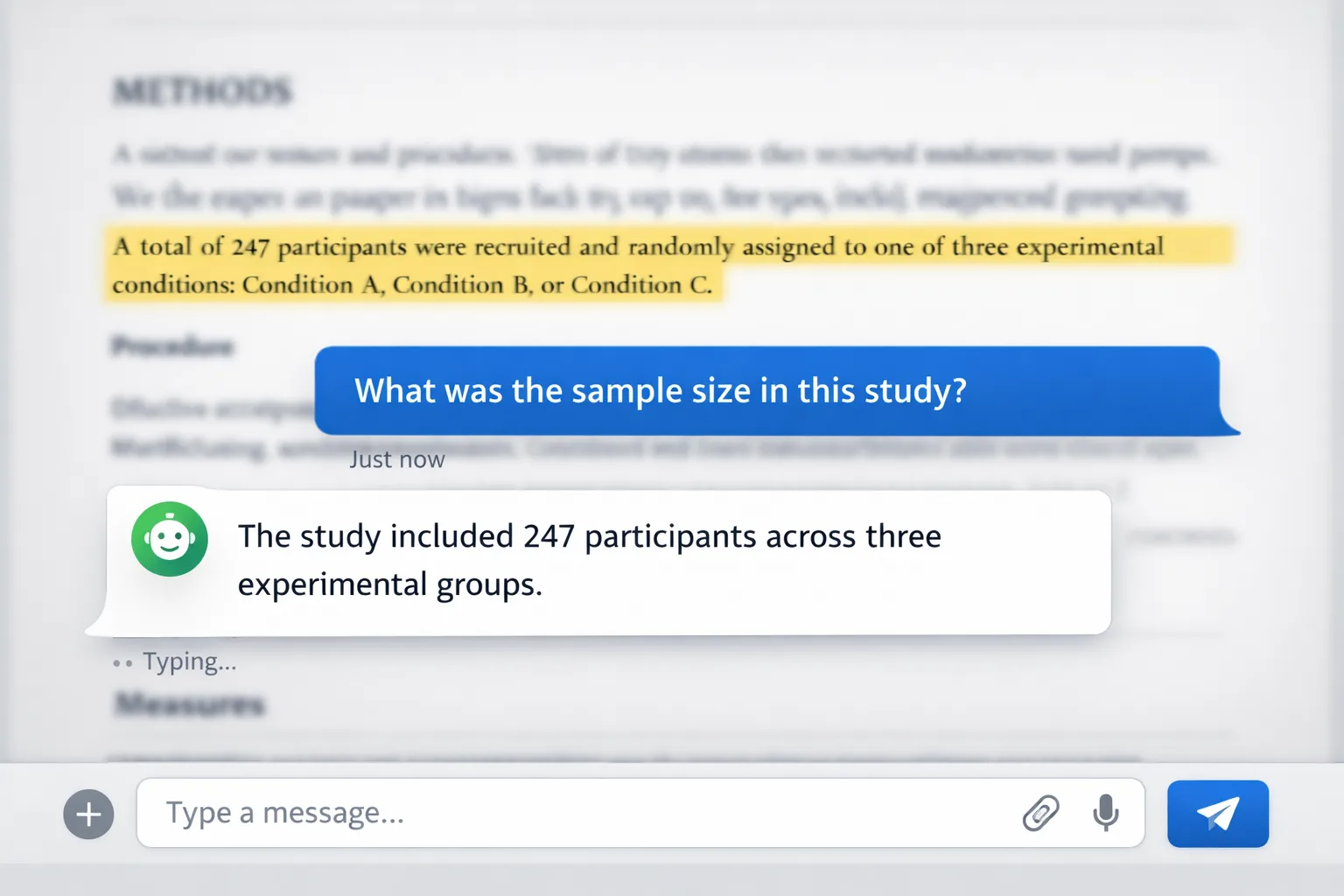
Imagine having a conversation with any research paper – that’s what free AI tools for summarizing research papers like ChatPDF offer. Upload any academic PDF and ask questions about methods, results, or conclusions, making dense papers immediately accessible. This is particularly valuable for quickly assessing paper relevance or understanding complex methodologies outside your specialization.
Paper Analysis Features:
-
Ask specific questions about methods, results, or conclusions
-
Get summaries tailored to your research interests
-
Extract data from tables and figures into usable formats
-
Free for PDFs under 120 pages and 50 questions daily
-
Supports multiple languages for international research
-
No account needed for basic functionality
Perfect for: Quickly understanding complex papers, interdisciplinary research, preliminary source screening, and extracting specific data points.
Limitation Awareness: The AI may misinterpret highly technical or niche terminology. Always verify crucial information against the original text.
7. Google Scholar with AI Extensions – Best All-Rounder
The foundation of free AI tools for academic research often starts with Google Scholar, but free AI browser extensions supercharge it. Extensions like “Scholarcy” or “Lateral AI” add smart summaries, highlighting, and organization to your familiar search workflow. This approach minimizes learning curves while maximizing functionality.
Enhanced Features:
-
AI-generated paper highlights and key point extraction
-
Automatic concept mapping and topic clustering
-
Smart organization by topic, methodology, or date
-
All extensions completely free with browser integration
-
Works alongside your existing search habits
-
Export organized libraries to reference managers
Best for: Researchers who want AI enhancements without learning new platforms, quick literature searches, and maintaining existing workflows.
Recommended Extensions:
-
Scholarcy: Creates summary cards from papers
-
Lateral AI: Finds similar papers and concepts
-
Kami: PDF annotation with AI assistance
-
Mate Translate: AI-powered translation of foreign research
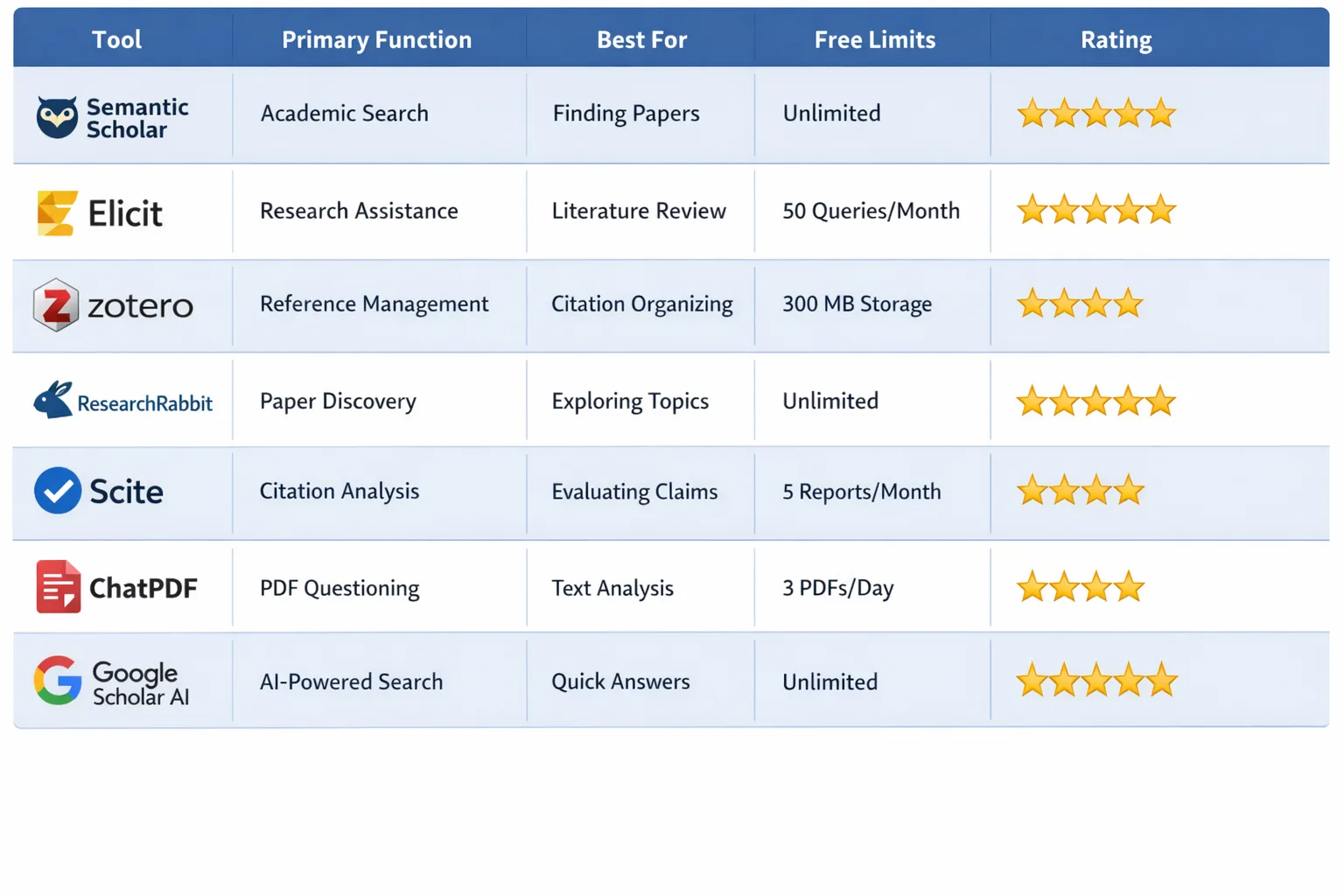
Free AI Tools Comparison Table: Features & Best Uses
| Tool Name | Primary Function | Best For | Free Tier Limits | Learning Curve | Our Rating |
|---|---|---|---|---|---|
| Semantic Scholar | Literature Discovery | Finding relevant papers | None | Low | 5/5 |
| Elicit | Systematic Reviews | Literature analysis | 5,000 credits/month | Medium | 4.5/5 |
| Zotero + AI | Reference Management | Citations & organization | None | Medium | 5/5 |
| ResearchRabbit | Visualization | Seeing connections | None | Low | 4/5 |
| Scite AI | Citation Analysis | Evaluating impact | 5 queries/month | Low | 4/5 |
| ChatPDF | Paper Analysis | Understanding papers | 120 pages/PDF | Low | 4/5 |
| Google Scholar AI | Enhanced Search | Everyday research | Varies by extension | Low | 4.5/5 |
How to Build Your Free AI Research Workflow
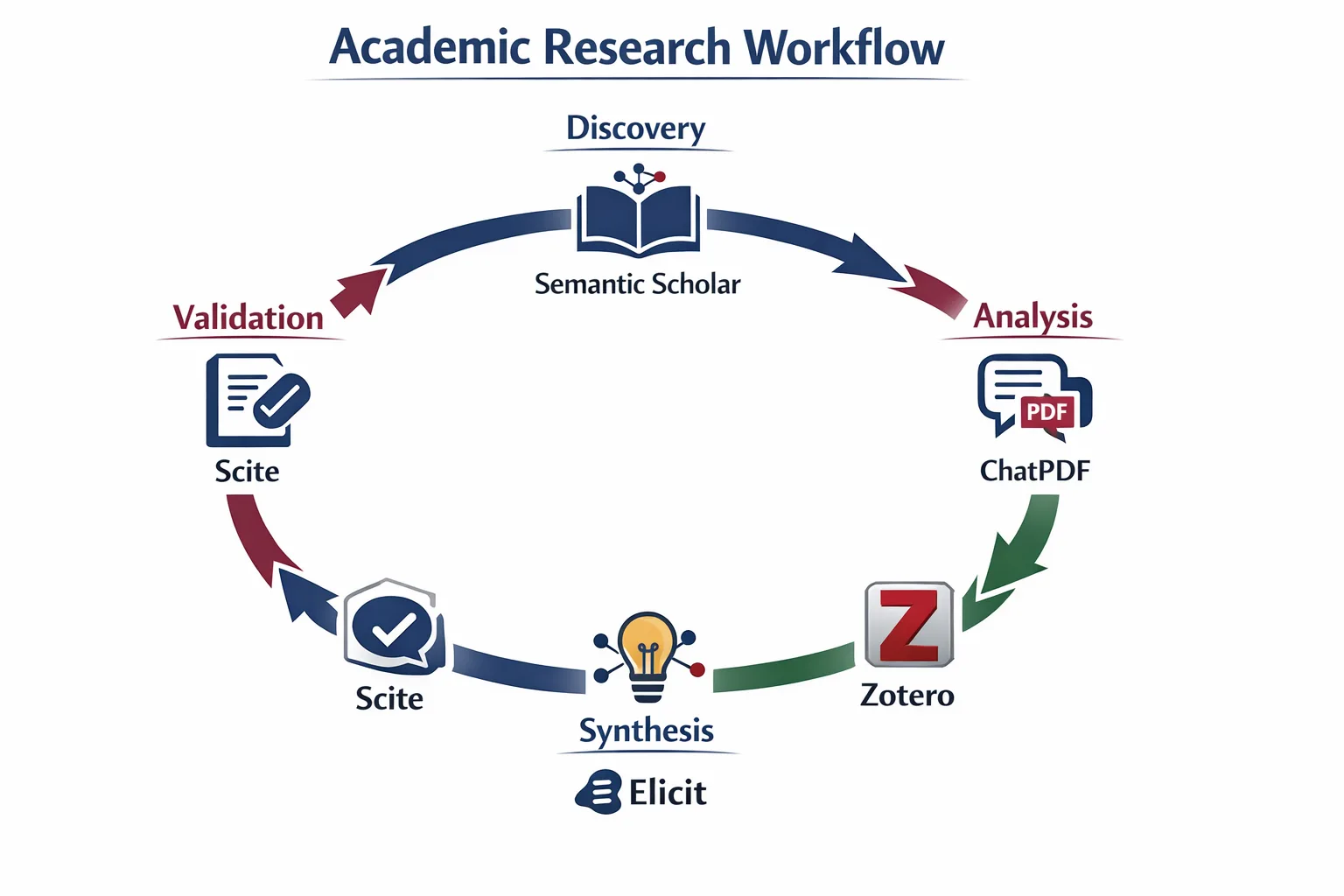
Implementing the best free AI tools for academic research requires strategic workflow design. Follow this proven 5-step process developed through testing with actual academic projects:
Week 1-2: Discovery Phase
Begin with Semantic Scholar or enhanced Google Scholar to cast a wide net for relevant literature using free AI tools for literature search. Set up alerts for your key topics and explore citation networks to understand the research landscape. Dedicate 2-3 hours to initial exploration without pressure to immediately find “perfect” sources.
Week 3-4: Analysis & Organization
Use ChatPDF for quick understanding of 20-30 promising papers, then import them into Zotero with AI-assisted tagging. Create folders by theme, methodology, or relevance level. This phase transforms a collection of PDFs into an organized research library.
Week 5-6: Deep Literature Review
Employ Elicit for systematic analysis of your top 50 sources and ResearchRabbit for visualizing connections between them. Look for patterns, contradictions, and gaps. Create a literature map showing how sources relate to your research questions.
Week 7-8: Citation & Validation
Utilize Scite AI to understand how key papers have been received and cited in your field. Identify which findings are well-supported versus controversial. This helps you position your work within ongoing academic conversations.
Week 9+: Writing & Synthesis
Leverage the insights gathered to structure your paper. Use your organized Zotero library for citations and reference Elicit analyses for your literature review section. The AI tools have done the heavy lifting, allowing you to focus on critical analysis and original contribution.
Free vs. Paid: When to Upgrade Your AI Research Tools
While this guide focuses on the best free AI tools for academic research, understanding upgrade triggers is crucial for maximizing your efficiency. Consider paid options when:
-
Volume Exceeds Free Limits: If you’re analyzing 100+ papers monthly or managing thousands of references
-
Advanced Features Needed: API access, batch processing, or custom integrations
-
Team Collaboration: More than 3 collaborators on a project
-
Sensitive Data Requirements: Enhanced security or HIPAA/FERPA compliance
-
Time Sensitivity: Priority support or faster processing for deadlines
Cost-Effective Upgrading Strategy:
-
Many tools offer 40-60% student discounts
-
Annual plans often save 20% over monthly
-
Some universities have institutional licenses (ask your librarian!)
-
Consider tool combinations rather than one expensive suite
Most researchers find the free tiers sufficient for 80% of their needs, paying only for specific projects requiring advanced capabilities.
Common Mistakes When Using AI Research Tools
Even with the best free AI tools for academic research, students often make these critical errors that undermine their work:
Mistake 1: Over-Reliance on AI Summaries
Problem: Using AI summaries without reading original sources
Solution: Read full texts of key papers (10-15% of your sources)
Checkpoint: Can you explain the methodology without looking at the summary?
Mistake 2: Ignoring Publication Dates
Problem: Citing outdated research because AI recommended it
Solution: Filter searches by date and prioritize recent work
Rule: For fast-moving fields, focus on last 3-5 years; for theoretical work, include classics
Mistake 3: Not Verifying AI-Extracted Data
Problem: Assuming AI perfectly extracted numbers or findings
Solution: Spot-check 20% of extracted data against originals
Red Flag: Statistics without confidence intervals or p-values
Mistake 4: Using Tools Outside Their Purpose
Problem: Trying to make literature tools analyze raw data
Solution: Match tool to task; use specialized tools for specialized work
Question: “What was this tool designed to do?” guides proper use
Mistake 5: Neglecting Your Own Critical Thinking
Problem: Accepting AI suggestions without evaluation
Solution: Use AI as research assistant, not research director
Test: Can you justify each source inclusion based on your criteria, not just AI ranking?
Further Reading: For help with properly integrating sources into your writing, check out our guide on Best AI Paraphrasing Tools.
Future Trends: AI in Academic Research for 2026
The best free AI tools for academic research will continue evolving rapidly. Based on current developments and expert predictions, expect these trends:
Trend 1: Integrated Research Ecosystems
Instead of separate tools, look for platforms combining literature review, data analysis, and writing assistance. Early examples include tools like “Consensus” that are expanding functionality.
Trend 2: Multimodal Analysis
Future tools will analyze not just text but also figures, tables, datasets, and even video/audio from research. This is particularly promising for fields like biology (microscopy images) or social sciences (interview recordings).
Trend 3: Discipline-Specific AI Models
Generic AI tools will be supplemented by models trained on specific disciplinary corpora. Imagine an AI trained exclusively on physics literature or Renaissance art history sources.
Trend 4: Enhanced Collaboration Features
Real-time collaborative filtering, shared annotation systems, and team-based AI training will make research more collaborative across institutions and borders.
Trend 5: Ethical AI Frameworks
As AI use becomes standard, expect formal guidelines from journals and institutions about proper AI use in research, similar to current statistical reporting standards.
Trend 6: Predictive Research Assistance
AI that doesn’t just find existing research but suggests novel combinations, predicts emerging topics, or identifies understudied areas with high potential impact.
Preparation Strategy: Develop fundamental research skills now while experimenting with AI tools. The researchers who thrive will be those who master both traditional methods and AI augmentation.
Frequently Asked Questions About Free AI Research Tools
Q: Are these truly free AI tools for academic research or just freemium traps?
A: All tools listed offer substantial free tiers suitable for most student and individual researcher needs. Some have premium upgrades (Elicit credits, Scite queries) but their free versions remain powerful for key tasks. We specifically excluded tools requiring payment for basic functionality.
Q: Can I use free AI tools for my thesis or dissertation research ethically?
A: Absolutely. These free AI tools for graduate students are specifically designed to handle thesis-level research. Many PhD candidates use these exact tools for their dissertation literature reviews. The key is transparency: document which tools you used in your methodology section, just as you would statistical software.
Q: How do free AI research tools handle data privacy with my unpublished research?
A: Reputable tools use encryption and clear privacy policies. For sensitive or unpublished research: (1) Review each tool’s data handling policy before uploading, (2) Consider using tools that process data locally rather than uploading to clouds, (3) Anonymize data before analysis when possible, (4) For highly sensitive work, consult your institution’s research ethics board.
Q: What’s the best free AI tool combination for humanities versus STEM research?
A: For humanities: Zotero (organization) + Semantic Scholar (discovery) + ResearchRabbit (connections) excel with book citations and theoretical works. For STEM: Semantic Scholar + Scite AI (validation) + ChatPDF (methods analysis) provide valuable technical analysis. Both benefit from Elicit for systematic analysis.
Q: Can these tools help with research proposal and grant application writing?
A: Yes, especially for the literature review and justification sections. Elicit helps identify research gaps, Semantic Scholar finds supporting literature, and Scite AI strengthens your case by showing how your work builds on well-supported findings. Some researchers report 30% time savings on proposal preparation.
Q: How much time should I expect to save using these tools?
A: Realistic expectations: 30-50% time reduction on literature reviews, 40-60% on citation management, 20-30% on paper analysis. The biggest savings come after the initial learning curve (typically 2-4 weeks of regular use).
Q: Will using AI tools negatively affect my critical thinking skills?
A: Not if used properly. Think of AI as a research assistant that handles repetitive tasks, freeing your cognitive resources for higher-order analysis, synthesis, and creativity. The danger isn’t using AI but using it unthinkingly. Maintain an active, critical engagement with both the AI outputs and the underlying sources.
Q: Are there completely free alternatives to ChatGPT for academic research?
A: Yes, the tools listed here are specifically designed for academic work, unlike general ChatGPT. For writing assistance, consider free academic versions of tools like Wordtune or the writing features in tools like Zotero. Many universities also provide free access to specialized AI writing tools through library subscriptions.
For a comparison of popular AI writing assistants, see our analysis of Quillbot vs Grammarly GO 2026.
Building Your AI-Augmented Research Practice
Implementing the best free AI tools for academic research represents one of the most significant productivity upgrades available to today’s students and researchers. By strategically combining tools like Semantic Scholar for discovery, Zotero for organization, and Elicit for analysis, you can dramatically reduce research time while improving quality and depth.
Your Action Plan for Next Week:
-
Day 1: Try Semantic Scholar with one of your current research topics
-
Day 3: Install Zotero with two AI plugins relevant to your discipline
-
Day 5: Use ChatPDF to analyze one complex paper you’ve been avoiding
-
Day 7: Review what you’ve accomplished and plan next integrations
Remember: the goal isn’t to replace your critical thinking but to amplify it with intelligent assistance. The most successful researchers of the coming decade will be those who skillfully combine human insight with AI capabilities. These free tools lower the barrier to developing this crucial skill set.
The academic research landscape is changing, and these free AI tools for academic research ensure you’re equipped not just to keep up, but to lead in your field. Start with one tool today, build your competency gradually, and watch as your research efficiency transforms while your academic rigor remains uncompromised.
Have you tried any of these tools? Share your experiences or questions in the comments below. For more AI academic resources, explore our guides on AI writing tools and paraphrasing software.




Leave a Comment
Your email address will not be published. Required fields are marked *
No Comments Yet
Be the first to share your thoughts!